> For the complete documentation index, see [llms.txt](https://docs.ohmyapp.io/main/llms.txt). Markdown versions of documentation pages are available by appending `.md` to page URLs; this page is available as [Markdown](https://docs.ohmyapp.io/main/guide/develop_app/command-execute-function/action/create.md).
# 데이터 등록 화면으로 이동(create)
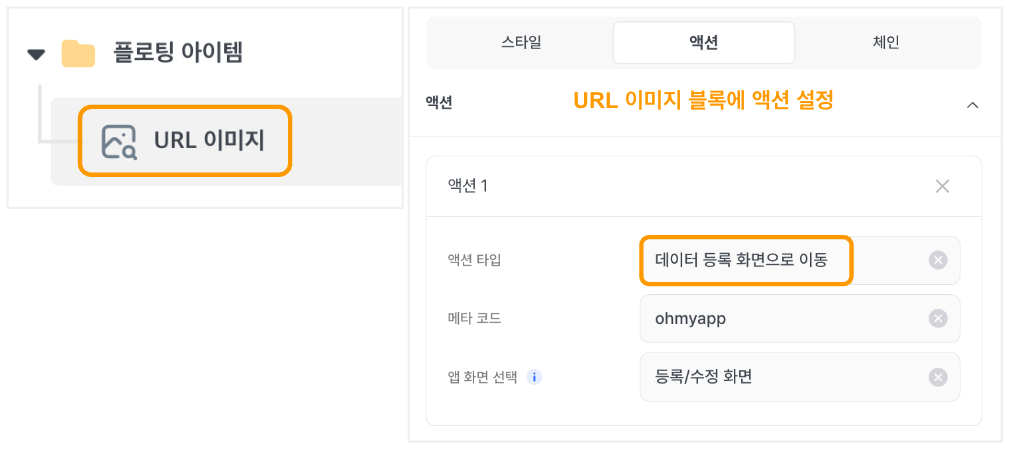
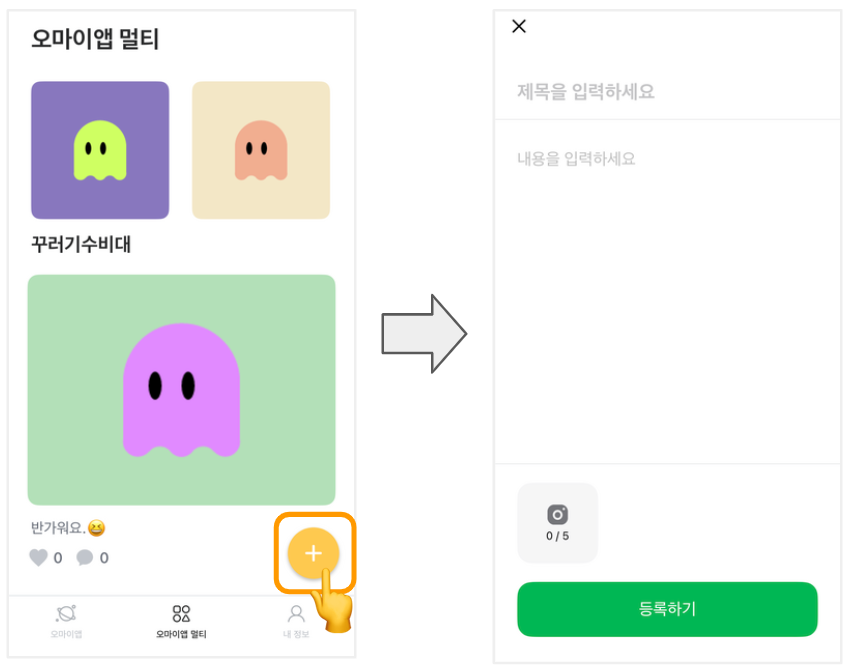
데이터 등록 화면으로 이동하는 동작을 수행해요. 주로 목록 화면에서 ' + ' 모양의 \[글 작성하기] 버튼 액션 설정에 많이 사용해요.
URL 이미지를 클릭하면, 설정한 **데이터 등록 화면으로 이동** 액션에 따라 원하는 메타의 데이터 등록 화면으로 이동해요.
> \#등록하는화면 #등록화면 #데이터등록 #데이터만들기 #데이터생성 #화면이동
2023.10.05 Jinny
\
**Transitioning to the Data Registration Page/Data Creation**
This function facilitates navigating the data registration page and initiating the data generation process. While similar to the 'Data registration/modification' action, it differs in its primary objective. The core intent behind the 'Transitioning to the Data Registration Page/Data Creation**'** action is focused on 'data registration'.
> \#registration page, #data creation, #generate data, #page transition
2023.08.08 Song